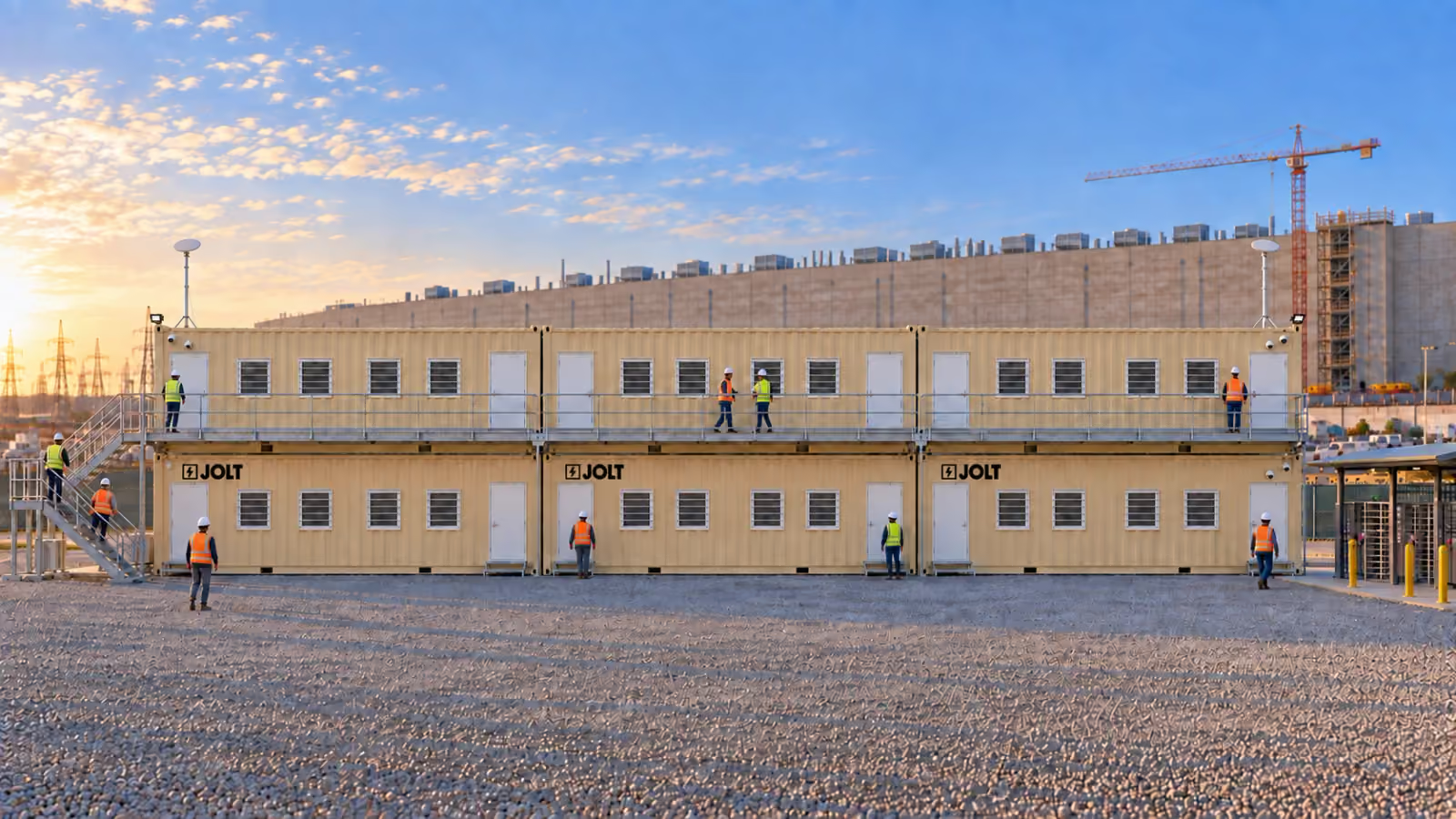
Grid Campus is 2 to 12 Grids placed in a row or stacked two-high, with a Stack Kit, a stair tower, landing and guardrail, for each stacked pair. Each unit still uses DC Deploy and can be relocated on campus, so the campus follows your phases instead of being rebuilt for them.
A double-wide office complex is the standard answer for a data center project team. A Grid Campus instead keeps each office in its own container, and the units can move separately as the work advances.
What is a Grid Campus?
A campus is any two or more Grids reserved for one site. Each Grid is its own unit with its own doors, its own heat pumps, its own 60 A power inlet, its own rack and its own subscription. The campus is how they sit together and how people move between them.
In a row, the units stand end to end with a gravel walkway along the door side. In a stack, a second Grid sits on top of the first on twist-locks at the four corner castings, and a Stack Kit gives the upper unit its stairs and landing. Rows and stacks combine: a six-unit campus can be three stacked pairs side by side with connected landings.
Both builds work in a campus. A GC's project campus is usually all Command. A campus shared with subs is Command for the GC and the gatehouse, Core for the second-tier trades that arrive after fiber and badging are live.
Row or stack: which layout fits a data center site?
Stack when the pad is the constraint. Stack when the owner's security program wants the project offices inside one fence with one badge point, because a stacked campus has one stair and two ground doors to control.
Row when the pad is long and the crane is not. Row when the campus is split by function: the GC at one end, the owner's rep at the other, the trades between, each with its own door on the walkway.
Either way, leave working room for the walkway, anchor system and heat-pump condensers.
What does a two-high stack need from the site?
A compacted, level pad must carry the stacked pair through cribbing at the lower unit's four corner castings. Asphalt and concrete can also carry it when the project engineer approves the placement.
Every stack is a crane set. The crane picks each unit by its four corner castings with a spreader bar, lands the lower unit on cribbing, then places the upper unit on twist-locks. Crane access, bearing capacity and overhead conflicts must be reviewed for the specific site.
Keep the crane's swing clear of tower-crane operations and temporary power lines. Walk the access route with your site contact before delivery day.
How are stacked Grids connected?
By the Stack Kit. A stair tower rises to a landing at the upper unit's door, with a guardrail. Each stacked pair on a campus has its own Stack Kit.
The upper unit sits on four twist-locks at the corner castings, locked before the crane releases. The lower unit is anchored at four points to the pad, and the stair tower carries its own anchors.
Power and data routes are coordinated at set. The site electrician supplies each unit from the project's temporary distribution, while network connections follow the site's communications plan.
How do the GC, the owner's rep and the subs share a campus?
Any way the site logistics plan says. The usual pattern: the general contractor holds the master reservation for the campus, takes the ground-floor units beside the stair for the project office and the gatehouse, and assigns the others. The owner's representative and the commissioning agent take a unit at the far end with its own door and its own network. The electrical and mechanical contractors take units on the upper row, or reserve their own beside the campus.
Each unit is its own subscription, so billing follows occupancy. A GC that wants one invoice for the campus reserves every unit; a GC that wants the subs to carry their own offices assigns pads and the subs reserve their own units, delivered in the same crane day.
Six or more Command units reserved on one campus earn a 5 percent rent credit for the first 12 months, applied automatically in the reserve flow.
What does a campus look like beside the gate?
Picture the main gate of a hyperscale campus in the morning. The badging queue runs under a canopy to the turnstiles. Beside it, stacked pairs of tan Grids stand end to end with a stair tower and landing at each pair. The ground units can serve the gatehouse, project office and superintendents; the upper row can serve the owner's rep and major trade contractors.
Every unit carries the GC's logo on the side facing the queue, because BRAND is included on Command. The campus becomes a visible project office that can move again when the next building phase starts.
What does a 4-unit, 6-unit and 12-unit campus cost per month?
The table shows rent, stack configuration, deposits, Stack Kit setup and term totals for common campus sizes. DC Deploy is quoted separately per campus.
See the complete data center pricing for the terms behind these totals.
How does a campus move from Building 1 to Building 3?
One unit at a time. When a building turns over, the site electrician disconnects the affected feeds, and the technician and crane crew remove the anchors, stair components and twist-locks before lifting each unit to the new pad.
On-campus relocation is $1,250 per unit per move. Teams can move the campus in pieces as the owner's rep, commissioning team and project office follow different phases.
A move to a different campus is a new DC Deploy, quoted for the new campus, because it is a new freight cycle and set.
How is power distributed across a campus?
Each Grid has its own power inlet and panel, so the campus is a group of individual loads. The site electrician sizes temporary distribution and provides a dedicated circuit to each Grid.
Before temporary power lands, the $1,850/mo generator add-on can support an individual Grid, with fuel supplied separately.
How long does a campus take to set?
The set schedule depends on unit count, stacking, access and site readiness. Stair towers, landings, twist-locks, anchoring and electrical walkthroughs are coordinated in the delivery plan.
The JOLT technician meets the trucks and coordinates placement with the site and crane crews.
Allocate units before drawing the campus
Begin with teams, not rectangles on a logistics plan. List every group that needs a controlled workroom, the phase when it arrives and the phase when it leaves. Then identify which groups can share a meeting room and which need a separate door, network or records area.
The project executive should decide who holds each reservation and who approves changes. Procurement should record the build, term, add-ons and responsible cost code for every unit. Site logistics should own the pad assignment and the path used for delivery, relocation and pickup.
Give the security lead a separate decision line. A gate-facing Command can support badge-vendor connections and WATCH, while another unit may sit deeper inside the site. The access vendor remains responsible for its readers and platform, so its work should be assigned to the correct door before the campus arrives.
IT should state whether each occupant joins site fiber, uses Command's included CONNECT service or supplies another temporary connection for Core. Keep owner, GC and trade networks separate where their policies require it. A shared walkway does not require shared communications.
Finally, assign furniture capacity honestly. Core includes four workstations. Command includes six. A plan table or conference table supports coordination, but it should not be counted as a permanent desk for every person who visits the campus.
This worksheet turns “six offices” into six traceable scopes. It also reveals when a department is being assigned a build because of its technology boundary rather than its place in the organization chart.
Compare a row with a two-high plan
A row is easier to understand at a glance. Each occupant has a ground-level door, and departments can be ordered along the pedestrian route. It consumes more pad length, so the layout must preserve access to every inlet, condenser, anchor point and egress path.
A two-high plan preserves ground area but adds crane and stair coordination. Each stacked pair needs one Stack Kit. The kit consists of a stair tower, landing and guardrail, and its setup is priced separately.
Ask who must use the upper unit during every phase. Consider visitor access, material carried to meetings and the project's accessibility plan. The optional ADA ramp and landing serves one door; it does not change access to an upper unit.
Also study how the campus will change. A row can release one end as a department demobilizes. For a stacked pair, put the future disposition of both units and the Stack Kit in the phase plan rather than treating either position independently.
Neither layout eliminates site engineering. The project team still verifies the bearing surface, anchoring criteria, pedestrian routes and emergency access. Avoid using stacking as a substitute for a site-specific review of a constrained pad.
Sequence the set around gates and cranes
Write a campus sequence that starts outside the fence. Identify the approved entry, site contact, holding area and path to the pad. Confirm which security orientation or escort requirement applies to drivers and technicians.
For a row, decide the placement order so an installed unit does not block access for the next one. For stacked pairs, align the sequence with the site's crane plan and the Stack Kit work. Keep the planned setup area clear of unrelated deliveries and stored materials.
Power should follow the final arrangement. Each Grid has its own inlet and panel, so the electrician needs a unit-by-unit circuit plan rather than a single note labeled “office power.” Mark each feed with the occupant or unit position to reduce confusion when departments move.
Network and badge work also needs a sequence. The IT and access vendors should know which units are Command, which are Core and when they can enter. They should verify their own connections instead of assuming that a physical set completes their scope.
Plan the pedestrian route before occupancy. Keep both personnel doors on every unit usable and separate the walkway from active vehicle movements under the site's safety plan. Recheck the route after stairs, landings, ramps and temporary distribution are in place.
Protect records and conversations in a mixed campus
A campus can place companies with different duties within a few steps of each other. Decide where owner reports, subcontractor pricing, personnel material, commissioning evidence and security records may be viewed or stored. Give a team its own unit when its information rules cannot be met in a shared room.
Use doors and network boundaries as the starting controls. Command is badge-ready, but the customer's access vendor provides the connected access-control system. Core has lever locksets and is site-fiber ready, so the customer should define key control and network access for that unit.
Set rules for the 75-inch display included in Command. Decide which meetings may show controlled drawings or schedules and who clears the screen afterward. The presence of a display does not change the owner's document-control policy.
Command's WATCH package combines its cameras and NVR with motion alerts, cloud clips and LTE backhaul. Before cameras are used, the customer should approve views, notices, users and retention choices under its project policy. Responsibility for lawful use, required notice and consent rests with the customer under section 13.3 of the Rental Agreement.
Separate visitor flow from private work where practical. A gate or orientation unit may receive a large number of people, while an owner's representative or commissioning team may need uninterrupted review space. Placing those uses in different units can be more effective than adding desks to one room.
Use expansion triggers instead of guessing the peak
Set measurable events that prompt another reservation. Useful triggers include a new prime contractor mobilizing, a second building entering fit-out, a gate function separating from the project office or an owner team requiring its own records boundary.
Tie each trigger to lead information. Record the preferred build, pad position, power source, network plan and person authorized to reserve. The standard on-site window is 6–8 weeks, so the phase schedule should expose the decision before the extra room is required.
Keep one position on the logistics plan available only if the site can genuinely support it. Verify drainage, delivery access, utility conflicts and egress rather than labeling an arbitrary gap “future office.” For a future stacked unit, reserve crane access and the complete Stack Kit area.
Contraction needs triggers too. When a team demobilizes, decide whether its unit leaves, relocates to the next phase or transfers to another approved occupant. Check the subscription holder, network access, badge credentials and records before the room changes hands.
The result is a campus that grows because the project changed, not because the original estimate was vague. Procurement can compare every addition with the approved allocation, and site logistics can reject a placement that has no safe route or utility plan.
How do I reserve a campus?
Choose the builds, site ZIP, quantity, target date, add-ons and protection through the data center reservation path; the confirmation provides the on-site window and a specialist responds within 15 minutes during business hours.
How many Grids can be stacked?
Grids stack two-high. Each stacked pair uses one Stack Kit with a stair tower, landing and guardrail.
What does a four-unit Command campus cost?
The campus table shows Command rent, protection and Stack Kit setup for the chosen layout. DC Deploy is quoted separately per campus; confirm the final configuration in the written quote.
What pad does a stacked campus need?
A stacked campus needs a compacted, level pad approved for its corner loads and suitable crane access. JOLT coordinates the set with the site's responsible teams.
Can different companies rent different units in one campus?
Yes. Each unit is its own subscription. The GC usually holds the master reservation and assigns units to the owner's rep, electrical and mechanical.
Are stacked units safe in wind?
Stacked pairs are pinned at the corner castings with twist-locks and anchored at the pad. Site-specific placement and anchoring must follow the project plan.
Can a campus be placed inside a fenced laydown yard?
Yes, when the delivery and crane plan provides safe access to the pad. Review fences, gates, overhead conflicts and working room before the delivery window.
How long does a campus take to set?
The set schedule depends on the number of units, stacked pairs, crane access and site readiness. The confirmed delivery plan covers placement, stairs and walkthroughs.
Can we add units later?
Yes. Additional Grids can join an existing campus through a new reservation and DC Deploy, subject to the current on-site window.