
The Grid · Lower 48 states
Nationwide Grid Command: badge-ready, connected, and ready the day it lands.
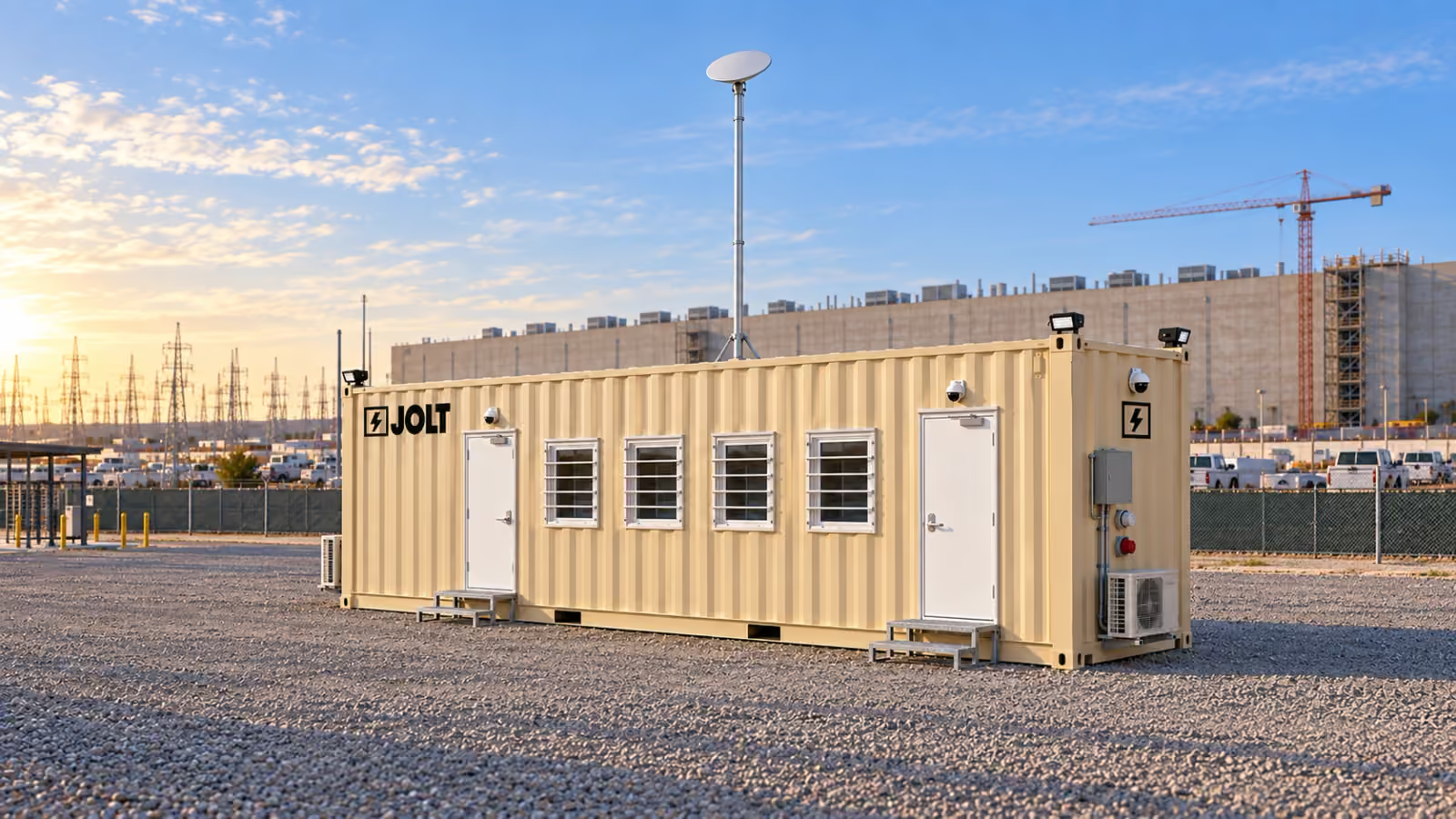
Grid Command is a badge-ready nationwide data center office with cameras, Starlink backup, six workstations and display for $2,750/mo.
$2,750/mo
12-month minimum · $2,500 reservation deposit.
- Minimum term
- 12 mo
- Deposit
- $2,500
- DC Deploy
- Quoted per campus
- On-site window
- 6–8 weeks
- Legal-width loadNo oversize permits
- On site in6–8 weeks
- One invoiceper unit
- Badge-ready
- Stackabletwo-high
- Moves withyour phases

Key facts
- The Command the Grid — 40 ft data center site office rents for $2,750 per month as of .
- The reservation deposit on the Command the Grid — 40 ft data center site office is $2,500 as of .
- The minimum rental term on the Command the Grid — 40 ft data center site office is 12 months as of .
- Grid delivery window is 6–8 weeks after the reservation as of .
Cite this page: "Nationwide Grid Command: badge-ready, connected, and ready the day it lands." JOLT (Jolt Rents), https://joltrents.com/data-centers/the-grid/command/. Last updated September 25, 2026.
Grid Command includes what a data center general contractor normally buys from several vendors: badge-ready door hardware, a four-camera LTE security system, Starlink backup internet, a generator inlet, and a furnished six-seat office with a 75-inch display. Your logo is included. It is the build most data center crews reserve.
Command costs $800/mo more each month than Grid Core. See all Grid pricing, fees and term totals.
What is included in Grid Command?
Command starts with the Grid chassis: a one-trip 40 ft high-cube ISO container, 40 ft × 8 ft × 9 ft 6 in, with 320 square feet inside. It has R-19 closed-cell foam in the walls, R-30 in the roof, FRP-over-gypsum interior walls, luxury vinyl plank on the floor, two 36-inch steel personnel doors, four 36 × 36 slider windows behind steel security grates, two 12,000 BTU cold-climate mini-split heat pumps, and a 100 A panel with an exterior disconnect and a 60 A twist-lock shore inlet.
On that chassis, Command adds nine things.
- Electric strikes, door contacts and low-voltage pathways on both doors for the owner's access-control vendor.
- Four IP cameras, an onboard NVR, LTE backhaul, motion alerts and 30-day cloud clips.
- A Starlink dish on a roof mast, a router, and 50 gigabytes of priority data a month.
- A 50 A generator inlet with a mechanical interlock on the panel.
- Six workstations instead of four.
- A 10 ft conference and plan table with eight chairs, and a second whiteboard wall.
- A 75-inch wall display with HDMI and USB-C.
- Eight half-height steel lockers and a coffee counter with a mini-fridge and a microwave.
- Four corner LED area lights, and your logo.
Everything else on Grid Core—the exit signs, emergency light, smoke and CO detector, extinguisher, first-aid cabinet, 12U rack with patch panel and Wi-Fi 6 access point, and plan rack—is on Command too.
Why is Command the unit most data center crews reserve?
Because of what a data center site is on the day the office arrives. There is no fiber. There is no temp power, or there is temp power at the gate and none where the office sits. The owner's security program requires badge control on every door before the first orientation. The GC's insurance carrier wants recorded cameras at the office. The project team needs a screen for the 6:30 huddle and a table for the drawings.
A crew that reserves a Core solves those problems one purchase order at a time: a camera vendor, a Starlink kit, a furniture rental, an electrician to prep the doors, a display on a cart. Each one is a call, a quote, a delivery window and a separate invoice. The site logistics manager has forty other calls that week.
A crew that reserves a Command solves all of them at once, on one invoice, on the day the truck arrives. The crew sets the unit, walks the generator inlet with the electrician and hands over the keys; WATCH and CONNECT are built in.
How do badge-ready doors work with our access-control vendor?
Every hyperscaler specifies its own access-control platform and its own credential, and no rental company should try to guess which one. So JOLT does not supply readers or cards. JOLT supplies the part that normally takes a week of coordination: the door prep.
Each Command door ships with an electric strike, a door contact and a low-voltage pathway for your access-control vendor. Your vendor mounts its reader, runs its cable through the pathway, lands on the strike and contact, and connects to its own panel. The lever lockset stays as the mechanical override.
What do the four cameras and LTE backhaul do?
Four IP cameras record to a network video recorder, while motion alerts and 30-day cloud clips use LTE backhaul.
The LTE connection lets the system work before the site has internet and keeps it working if the site network drops. When fiber is live, the NVR can move to it and LTE can stay as failover.
How does Starlink work as a backup to site fiber?
Command carries a Starlink dish on a roof mast, a router, and a service plan with 50 gigabytes of priority data a month. It gives the office a day-one connection for drawings, email, badging enrollment, safety apps and video calls.
When site fiber arrives, your IT contractor lands it in the rack and Starlink becomes failover. The router prefers fiber and falls back to the dish when fiber drops. Unlimited Starlink data is $75/mo more for a site that will run on the dish longer.
Starlink needs a clear view of the sky. On a campus with a tower crane, coordinate the mast position with the crane plan.
How does the generator inlet bridge the temp-power gap?
An electrical contractor mobilizes to a data center site before the first temp panel is energized. The GC's office arrives before the utility's temporary service does.
Command has a 50 A generator inlet wired to the panel through a mechanical interlock, so the generator and shore power can never feed the panel at the same time. Connect a generator and the office can run before shore power lands; the site electrician confirms the load plan.
JOLT's 25 kW standby generator is an add-on at $1,850/mo plus fuel. When the temp panel is live, your electrician connects the 60 A shore inlet and the generator goes home.
What is the furniture and display package?
Six workstations, each with a chair, receptacles and a Cat6A drop. A 10 ft conference and plan table with eight chairs, two whiteboard walls and a plan rack.
A 75-inch wall display with HDMI and USB-C supports coordination drawings, the BIM model, the schedule and safety briefings. Eight half-height lockers and a coffee counter with a mini-fridge and microwave complete the room.
The furniture is JOLT's and stays with the unit.
What does Command cost over 12, 24 and 36 months?
Command's monthly rent, deposit, add-ons, term totals, purchase price and lease-to-own plan are maintained on the Grid pricing page. DC Deploy is quoted per campus.
What does Command replace on a typical site logistics budget?
Command combines four-camera security with LTE, Starlink service, six workstations, access-control door prep, a 75-inch display, a generator inlet and your logo. Those items are included instead of arriving through separate vendors and invoices.
The vendors are not the only cost. Each one is a purchase order, a COI, a delivery to coordinate, a separate invoice to code, and a separate call when it breaks. Command puts all of it on one line and one phone number.
How do I reserve a Command?
Choose Command and follow the data center reservation steps, or go directly to reserve Grid Command.
Draw the access-control boundary before mobilization
Badge-ready is a scope boundary, not a complete credential system. Its included preparation covers door contacts, electric strikes and low-voltage pathways. The project still selects the readers, credentials, controller, power supplies, software and access rules that belong to its security program.
Put that division into the office scope sheet before the access-control vendor prices the work. Identify both Command doors, the desired monitoring state for each contact and the location of the vendor's own panel. Ask the vendor to document every field item it needs beyond the included door preparation.
The security lead should also decide who may enter mechanically when the electronic system is unavailable. Command retains lever locksets, but the project controls keys and permissions. Record that decision with the gate plan rather than leaving it to the installer at turnover.
Treat reader mounting and cable work as controlled alterations. The rental use rules prohibit drilling, cutting or altering rented equipment. Give the vendor the included pathways and require written approval before it proposes a penetration or a different mounting method.
Plan the fiber handoff without assuming automatic failover
Command arrives with CONNECT: Starlink on a roof mast, a router and the included priority-data plan. That gives the IT team a defined starting configuration while it plans the eventual site-fiber handoff.
Before reserving, ask whether the office will carry only ordinary project traffic or also support bandwidth-heavy meetings, model reviews and software updates. The answer helps procurement decide whether the included plan is enough or whether to select the unlimited-data upgrade.
The network lead should name the person authorized to connect site fiber to the office rack. It should also provide the addressing, firewall, authentication and monitoring requirements that apply to a temporary project office. Command supplies a site-fiber-ready rack and access point, but the project owns those network decisions.
Do not write an uptime promise into the mobilization plan. The connectivity terms state that satellite and cellular service depends on third-party networks, weather, terrain, sky view and power. The same section says speed, coverage, capacity and availability are not guaranteed.
The crane plan and the network plan need one shared review. Starlink requires sky view, so procurement should give the logistics team the proposed office position before placement is fixed. The team can then compare that position with crane activity, future structures and other known obstructions.
Set rules for cameras, clips and incident requests
WATCH provides an NVR and four IP cameras, along with cloud clips, LTE backhaul and motion alerts. Before those tools enter an active jobsite, the project should settle who administers access and how recorded material fits its security policy.
Start with notice. The camera and telematics provision makes the customer responsible for legally required notices, signage and consents at the site. Lawful use of footage remains the customer's responsibility.
The site security lead should identify where notices belong before the office opens. It should confirm whether project rules restrict audio, visitor recording or views beyond the project boundary. Those are jurisdictional and owner-policy questions, not settings to infer from the included equipment.
Write a short access roster for footage and alerts. Name the role that reviews an event, the role that may export a clip and the person who responds to a request from the owner, law enforcement or an insurer. Avoid giving broad access merely because several firms share the office.
Placement matters here too. Review intended camera views with the site security plan before the unit is set. The review should consider gates, doors, neighboring property, worker congregation areas and any place the owner does not want recorded.
Finally, agree on what an alert means. Motion notification is information, not a promised dispatch service. The project should state who receives the alert, who checks the event and who has authority to act.
Give the electrician a real generator decision
Command includes a 50 A generator inlet and mechanical interlock. It also includes the 60 A shore inlet used for the project's temporary electrical service. Those interfaces do not replace an electrician's load plan.
Give the electrician the included office equipment list and ask for a written plan for the actual source. The plan should account for expected office use, connected owner equipment and the conditions at the selected placement. Do not assume that an inlet rating answers every source-sizing question.
Identify who supplies the connecting equipment and who is permitted to operate it. The utility-use requirements require customer-supplied utilities to connect through the provided inlets and require a licensed electrician to make those connections in compliance with code.
The team should decide whether it wants the available JOLT generator add-on or will provide a compatible source through its electrical contractor. If it selects the add-on, procurement should keep the fuel billing rule with the quote. If it provides the source, the electrician should confirm compatibility rather than relying on a verbal assumption.
Create a handoff point for shore power. The site electrical lead should notify the office owner when the temporary circuit is available, inspect the proposed connection and control the change from generator supply. The mechanical interlock is included, but the project's qualified electrician owns the site procedure.
Compare the Command quote by responsibility, not labels
For security, ask the bidder to state the camera quantity, recording location, backhaul, alerting and clip scope. Then list the customer's remaining work for notices, administration, monitoring and response. Command's included items can be checked directly against that written split.
For networking, separate physical infrastructure from service. Record whether the quote includes a rack, structured cabling, wireless access point, satellite hardware, router and data plan. Add a separate line for the owner's fiber, network policy and final handoff.
For electrical mobilization, distinguish an inlet from a generator. Record the provided shore and generator interfaces, any generator rental selected, fuel treatment and the electrician's connection work. A quote that combines those concepts into one vague line is not ready for approval.
For the room itself, verify the working-seat count, meeting surface, chairs, display connections, lockers and food counter equipment. Procurement can then compare a furnished Command with a shell plus several owner purchase orders.
Keep one-time work separate from recurring rent. The pricing page maintains Command rent, deposit, upgrades and term totals in one place; DC Deploy is quoted per campus. A comparison sheet should preserve those categories instead of collapsing them into an unexplained monthly equivalent.
Why does Command cost more than Core?
It includes the camera system, Starlink, badge-ready door prep, generator inlet, six workstations, a 75-inch display, lockers, a coffee counter and your logo.
What is the 24-month total for Command?
The 24-month total is $79,150.50, including rent with the anniversary escalator, damage waiver and environmental fee. DC Deploy is quoted separately per campus.
Do the cameras need the site network?
No. They record to an onboard NVR and send alerts over LTE. When site fiber arrives, they can move to it.
Does Starlink replace site fiber?
No. It is the backup and the day-one connection until fiber is live, then it can remain as failover.
Can we mount our own badge readers?
Yes. Both doors have electric strikes, door contacts and low-voltage pathways for your access-control vendor.
What generator does Command run on?
Use a compatible generator for the 50 A inlet; JOLT's 25 kW add-on is $1,850/mo plus fuel and can leave when temp power lands.
Is the logo really included?
Yes. BRAND, a $450 one-time line on Core, is included on Command.
How is Command billed?
It is one subscription per unit: rent, add-ons, 12% damage waiver and 5% environmental fee, with a 12-month minimum and a 5% anniversary escalator. PO and net-30 are available to general contractors on a signed master rental agreement after credit approval; otherwise billing is by ACH auto-pay.
Your delivered price
Pick the unit, rent or buy, and the job ZIP. Monthly rent and the route show as you go; we email the full delivered price with a 14-day lock.
Pick a length
Drawn to scale, side view.
Step 1: Unit
The Grid · Command
Which 40 ft?
Step 2: Rent or buy
12-month starting term for project quotes.
Step 3: Job ZIP
Delivery and pickup: quoted for your site.
Step 4: Send it
Request a written delivered quote from the project desk.
Step 5: Your project quote
- JOLTSite offices for data center construction. Nationwide.
- DataCenterGuideNationwide data center site office pricing. All of it.
- DataCenterGuideDC Deploy for any campus in the lower 48.
- DataCenterMarketData center site offices in Texas: The Grid, nationwide.
- DataCenterMarketData center site offices in Virginia: The Grid, nationwide.
- DataCenterMarketData center site offices in Ohio: The Grid, nationwide.
- DataCenterProductThe Grid. The 40 ft site office for data center campuses. Nationwide.
- DataCenterProductGrid Core: the data center site office, delivered nationwide
Talk to a data center specialist.
$2,750/mo · DC Deploy quoted per campus
A deposit holds your delivery window. Cancel free of charge more than 14 days before the first day of the window. Deposits from $85 are applied to your first invoice.