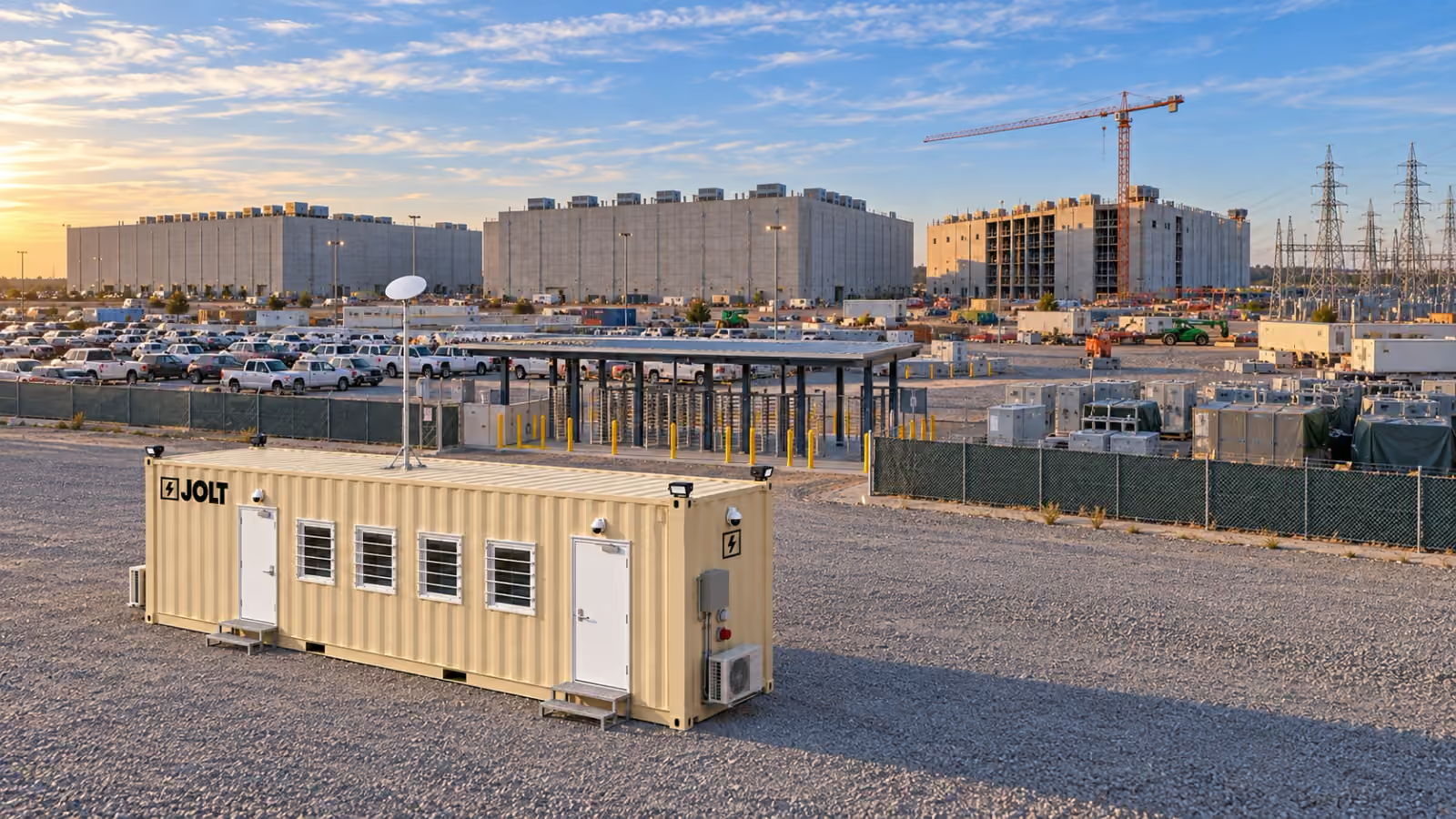
The Grid is a 40 ft high-cube container site office in two builds, Core and Command. Command is the build for crews that need badge-ready doors, cameras, Starlink and a generator inlet built in.
One chassis. Two builds. No options list. The only thing you decide is Core or Command, and how many.
What is The Grid built from?
The chassis is a one-trip 40 ft high-cube ISO shipping container. One-trip means it made one ocean voyage from the factory. High cube means the chassis is 9 ft 6 in tall.
The exterior is 40 ft long, 8 ft wide and 9 ft 6 in tall. The four corner castings are the lifting, stacking and anchoring points.
Inside the steel, the walls carry R-19 insulation and the roof R-30. The interior walls are fiberglass-reinforced panel over gypsum, and the floor is luxury vinyl plank.
Two 36-inch steel personnel doors with lever locksets give two means of egress. Four 36 × 36 slider windows each sit behind a steel security grate.
Core or Command: which build do I reserve?
Reserve Core when the office is one of several on a campus that already has fiber, cameras and a badging system, or when the build is a small edge or modular site with a four-person team. Reserve Command for the first office on a site, a gatehouse, or a trade that mobilizes before temp power and fiber exist. Command costs $800/mo more and carries the security, connectivity and conference package.
What is inside a Grid Core?
A Core is the working office. Four workstations, an 8 ft plan table with four chairs, a whiteboard wall and a plan rack. Exit signs mark both doors, and emergency lighting, smoke and CO detection, an extinguisher and a first-aid kit ship with the office.
The wall-mount rack includes a Cat6A patch panel and a Wi-Fi 6 access point. It is site-fiber ready for the site's fiber contractor. The site owns and secures the network.
What does Grid Command add?
Command starts with Core and adds the layer a data center site logistics manager would otherwise coordinate separately.
Access control. Both doors ship with electric strikes, door contacts and low-voltage pathways. Your badge vendor, whoever the owner has specified, mounts the readers and connects them to the owner's system. Until the readers arrive, the doors use their mechanical locksets.
Cameras. Four IP cameras record to an onboard NVR and can send motion alerts over LTE, so the system works before site internet and keeps working if it drops.
Internet. Starlink gives the office a connection before fiber and remains as failover after fiber goes live. Unlimited Starlink is available for $75/mo.
Generator. A generator inlet with a mechanical interlock lets the unit operate before temp power is available. JOLT's 25 kW standby generator is $1,850/mo plus fuel.
The room. Six workstations, a conference and plan table, a second whiteboard, a display, lockers, and a coffee counter with a mini-fridge and microwave.
Outside. Area lights, roof masts for the camera and dish, and your logo on two sides.
How is The Grid heated, cooled and powered?
Two cold-climate mini-split heat pumps serve the room. Two 12,000 BTU units heat and cool the room.
The electrical system is a 100 A panel with an exterior disconnect and a 60 A twist-lock shore inlet, and DC Deploy includes an electrical rough-in walkthrough with your site electrician on delivery day.
How does data, badging and security work in a Grid?
The network is yours. The rack, patch panel and cabling are installed; the site's IT contractor lands its fiber and switch in the rack, and the Wi-Fi 6 access point broadcasts whatever SSID the site uses.
Badging is the owner's system. Command doors are prepped for it; JOLT does not supply readers or credentials because every owner specifies its own system. JOLT supplies the strikes, contacts and pathways.
Security starts with the steel chassis, grated windows and commercial doors. Command adds cameras, area lighting and preparations for the owner's access-control system.
How many people work in a Grid?
Core has four workstations. Command has six workstations and a larger conference and plan table.
For a larger team, reserve a Grid Campus: 2 to 12 Grids in a row or stacked two high with a Stack Kit at $395/mo plus $1,500 per stacked pair.
How does a Grid get to a site and how does it move between phases?
A Grid's 8 ft chassis width makes it a legal-width load. It can travel by flatbed without the oversize-permit process required by a wider office trailer.
DC Deploy covers freight to the lower 48, tilt-bed placement or crane set, leveling on cribbing, four-point anchoring, an electrical rough-in walkthrough and pickup; the complete scope is on the nationwide delivery page.
When work moves to another building, the Grid can be disconnected, lifted by the corner castings, placed and reconnected. On-campus relocation is $1,250 per move.
What does a Grid cost over 12, 24 and 36 months?
Add-ons are separate lines. The available Grid options and their current prices appear on the pricing page.
Choose the build from the services already on site
Start with the systems the project can actually hand to the office on its planned placement date. Core is the direct choice when the campus can provide site fiber, ordinary door security and shore power. It includes the rack, patch panel, Cat6A drops and Wi-Fi access point needed for the site's network team to complete its own handoff.
Command adds three systems useful during early mobilization. CONNECT includes Starlink with 50 GB priority data. WATCH has its own LTE backhaul, while a mechanically interlocked generator inlet provides the generator-ready connection. Electric strikes, door contacts and low-voltage pathways prepare both doors for the owner's badge vendor.
Those additions do not transfer control of the owner's systems to JOLT. The owner still determines credentials and access rules. The site's network team still owns its connection, security settings and fiber. The site electrician still confirms the source, connection and load plan.
Ask the superintendent for the temporary-power milestone rather than the permanent-service date. Ask IT whether a fiber strand, switch and configured network will reach the office pad. Ask security whether mechanical locksets are acceptable during mobilization or whether both doors need to join the campus badge system.
Core may remain the better fit even on a large campus. A trade office placed inside an established compound can use the services already operating there. Command is useful when the office must establish its own working layer while those campus services are incomplete.
Write those answers into the office scope before comparing rent. A lower base price is not a like-for-like comparison if the project must separately source early connectivity, cameras or badge-ready door hardware.
Give the electrician a complete handoff packet
The electrician needs the office build, the planned power source and the pad location before delivery. Core's electrical equipment includes its 100 A panel, exterior disconnect and 60 A twist-lock shore inlet. Command adds a separate generator inlet rated at 50 A, together with a mechanical interlock.
The handoff packet should identify whether the first source is shore power or a generator. It should name the person responsible for the customer-supplied conductors and connection. It should also identify the target date when temporary service is expected to replace a generator.
List the loads the project plans to introduce inside the office. The included receptacles, USB receptacles, lighting, heat pumps and office equipment define the delivered build. Any customer equipment added later belongs in the electrician's load review rather than an assumption made from the panel rating.
For Command, document who supplies the generator and who manages fuel. The available JOLT generator is a 25 kW standby unit connected through the generator inlet. Fuel is billed separately under that add-on.
The electrical rough-in walkthrough included with DC Deploy is the point for the site electrician to review the delivered connection. It is not a substitute for the project's electrical design, inspection or energization responsibilities.
Keep the approved connection information with the office records. A later campus relocation changes the office's physical context, so the electrician should review the source and planned reconnection at the new pad before the move.
Define the network and access-control demarcation
The Grid supplies physical infrastructure, not the owner's technology policy. Both builds provide six Cat6A drops. Their other included data components are a 12U wall rack, Wi-Fi 6 access point and patch panel. The project decides what network equipment and service it will place in that rack.
Before arrival, the network lead should name the intended upstream connection. Record whether the opening condition is site fiber or, for Command, the included Starlink service. Identify who supplies the switch, assigns the network, configures the SSID and controls administrative credentials.
WATCH is built into Command. Its components are four IP cameras and an NVR, plus LTE backhaul and motion alerts. Cloud clips have a 30-day duration. The project should decide who may view recordings and alerts before personnel begin using the office. That decision belongs with the owner's security and privacy rules, not with the furniture plan.
Badge readiness has a similarly clear boundary. Command supplies electric strikes, door contacts and pathways at both doors. The owner's access-control vendor supplies and integrates the readers and credentials.
Give that vendor the office location, both controlled-door locations and the project's approved access system. Ask the vendor to confirm its power, controller, cabling and commissioning scope in writing. Do not treat “badge-ready” as meaning the office already belongs to the owner's access-control database.
Core retains the two steel doors and lever locksets without the Command badge preparations. If the access-control requirement is discovered after Core is selected, resolve the resulting scope before reserving instead of assuming field modification is included.
Plan the first office and the next campus unit together
The first office often carries shared functions while the compound is small. As the project adds buildings, trades or owner personnel, one room may no longer support focused desk work, drawing review and meetings at the same time.
Use workstations as a fixed planning input. Core includes four. Command includes six. Its conference and plan table is 10 ft long and comes with eight chairs.
Assign named functions to those seats before selecting quantity. Separate daily occupants from people who only attend a huddle or drawing review. A chair at the conference table is not another workstation, and a plan table should not quietly become permanent desk space.
Also identify which functions require the Command package. A gate-facing security office may need badge preparations and WATCH. An interior document room on the established network may need only Core. Selecting by function can be clearer than giving every department the same build.
The Grid Campus range supports 2 to 12 units. For a stacked pair, the Stack Kit supplies the stair tower, landing and guardrail. The kit and its setup are charged per stacked pair.
Reserve future physical space in the logistics plan even if the second unit is not ordered with the first. Protect the planned bearing area, access route and utility path from laydown changes. If stacking is being considered, coordinate the crane plan and local review before treating the upper position as available.
Set an expansion trigger that procurement can observe. Examples include all included workstations being assigned, a separate controlled-access function becoming necessary, or the project opening another building area too far from the current office workflow. The trigger should describe a business need, not an arbitrary calendar date.
Inspect the delivered scope against the selected build
An acceptance check should begin with the reservation record and the included scope for Core or Command. Confirm the one-trip high-cube chassis, two personnel doors, four grated slider windows and the specified interior finishes without substituting expectations from a trailer or another container office.
Inside, count the included workstations and chairs for the selected build. Confirm that the plan table, plan rack and whiteboard surfaces are present. For Command, include the display, lockers, second whiteboard and coffee counter equipment in the room check.
The electrical review should identify the exterior disconnect, panel and shore inlet. Command's review also includes the generator inlet and mechanical interlock. The site electrician should address the source and conductors through the DC Deploy rough-in walkthrough.
For the network layer, identify the rack, patch panel, access point and six Cat6A drops. Command adds the Starlink equipment and WATCH components. Record the handoff items still owned by site IT, the camera administrator and the badge vendor.
Walk both egress doors rather than checking only the primary entrance. Locate the exit signs, emergency light, smoke and CO device, extinguisher and first-aid equipment. Confirm the exterior lighting included with the selected build.
Finish outside at the four corner castings used for the anchoring points. Four-point anchoring and cribbing used for leveling are included in DC Deploy. Project-specific criteria still need to be communicated through the site's logistics and authority review.
Keep a concise exception list tied to an included item. That produces a useful handoff record and avoids expanding acceptance into features that were never part of Core, Command or a selected add-on.
How do I reserve a Grid?
Use the full reservation procedure on the data center site-office hub, then reserve Core or Command.
What are the exact dimensions of The Grid?
The chassis is 40 ft long, 8 ft wide and 9 ft 6 in tall, with 320 square feet of floor area.
How much does The Grid weigh?
DC Deploy covers freight, placement, leveling on cribbing, four-point anchoring, the electrical rough-in walkthrough and end-of-term pickup. It is quoted per campus in one business day. Call 970-279-1015 or email reserve@joltrents.com with the campus address, unit count and target date.
What is the difference between Core and Command?
Core is the office: the insulated envelope, two doors, four windows, HVAC, power, data cabling and four workstations. Command adds badge-ready doors, four cameras, Starlink, a generator inlet, six workstations, a display, lockers and a coffee counter, and it includes your logo.
How many people can work in a Grid?
Core provides four workstations and Command provides six. Teams needing more offices can reserve a Grid Campus of 2 to 12 units.
Can The Grid run without utility power?
Command has a generator inlet with a mechanical interlock. The 25 kW generator add-on is $1,850/mo plus fuel.
Is the door hardware compatible with our access-control vendor?
Command doors ship with electric strikes, door contacts and low-voltage pathways so the owner's access-control vendor can install its readers. Core uses commercial lever locksets.
What heating and cooling does it have?
The Grid has two cold-climate mini-split heat pumps.
Can I buy a Grid instead of renting?
Yes. Core is $48,000 and Command is $64,000, or lease-to-own over 36 months at $2,095/mo or $2,795/mo with title on the final payment.