
The Grid · Lower 48 states
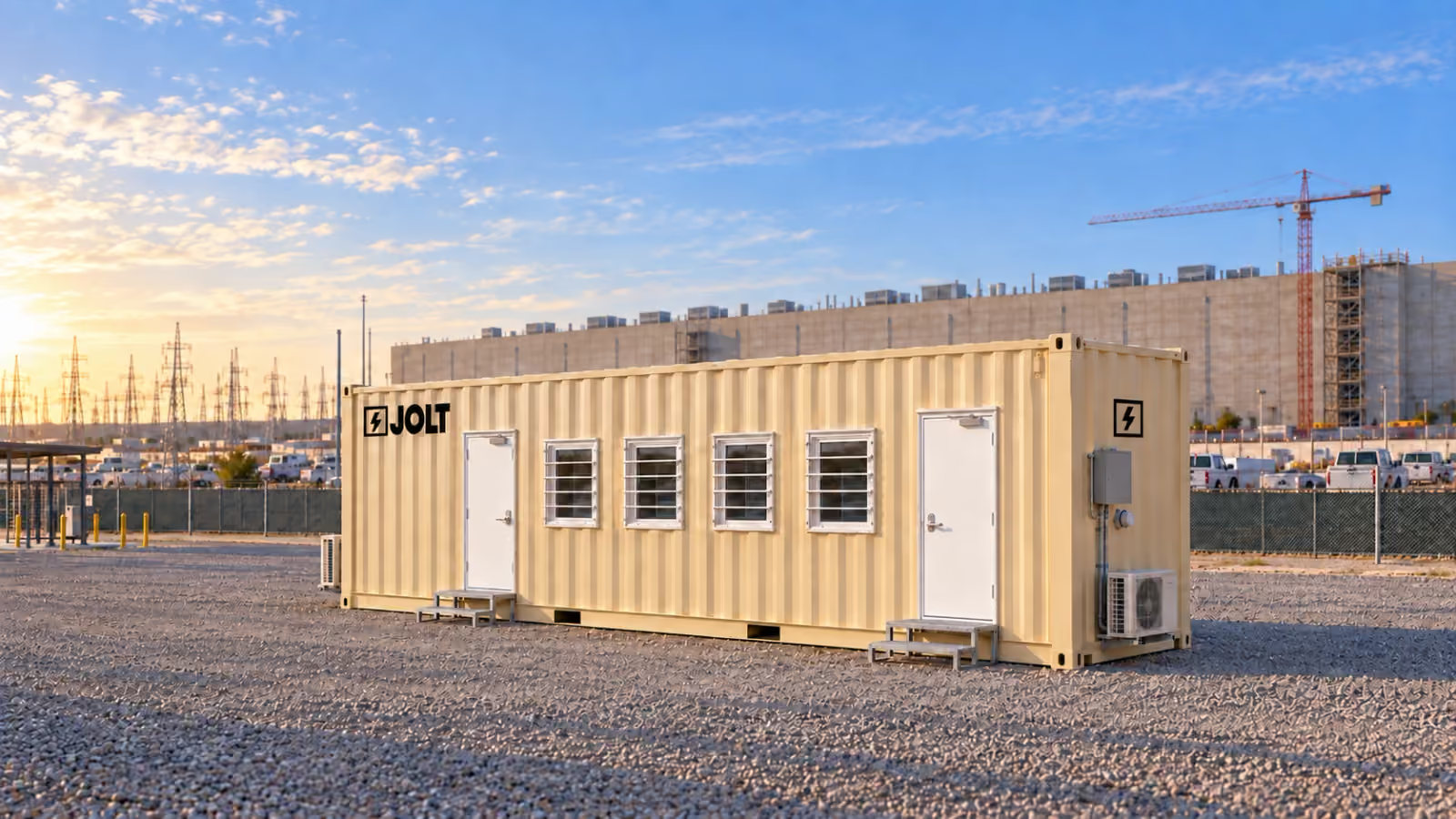
Grid Core: the data center site office, delivered nationwide
Grid Core is JOLT's 40 ft container site office with four workstations, insulated envelope, power and data cabling, at $1,950/mo.
$1,950/mo
12-month minimum · $2,500 reservation deposit.
- Minimum term
- 12 mo
- Deposit
- $2,500
- DC Deploy
- Quoted per campus
- On-site window
- 6–8 weeks
- Legal-width loadNo oversize permits
- On site in6–8 weeks
- One invoiceper unit
- Badge-ready
- Stackabletwo-high
- Moves withyour phases

Key facts
- The Core the Grid — 40 ft data center site office rents for $1,950 per month as of .
- The reservation deposit on the Core the Grid — 40 ft data center site office is $2,500 as of .
- The minimum rental term on the Core the Grid — 40 ft data center site office is 12 months as of .
- Grid delivery window is 6–8 weeks after the reservation as of .
Cite this page: "Grid Core: the data center site office, delivered nationwide." JOLT (Jolt Rents), https://joltrents.com/data-centers/the-grid/core/. Last updated September 25, 2026.
Grid Core is the base build of JOLT's 40 ft high-cube container site office. It is the same one-trip 40 ft high-cube chassis as Grid Command, with the same envelope, doors, windows, heat pumps, power and data cabling, without the security, connectivity and conference package. It is the office.
It is the right unit for a second office on a campus that already has fiber, cameras and badging, and for a four-person team on an edge or modular build.
If this is the first office on the site, or the gatehouse, or a trade mobilizing before temp power exists, reserve Command instead. This page is for everyone else.
What is included in Grid Core?
Everything on this list is on the unit when it lands.
- A one-trip 40 ft high-cube ISO container, 40 ft by 8 ft by 9 ft 6 in, with four corner castings.
- R-19 insulation in the walls and R-30 in the roof, with FRP-over-gypsum interior walls and a luxury vinyl plank floor.
- Two 36-inch steel personnel doors with lever locksets, providing two means of egress.
- Four slider windows behind steel security grates.
- A 100 A electrical panel with an exterior disconnect and shore inlet.
- Two cold-climate mini-split heat pumps.
- LED lighting, exit signs, emergency lighting, smoke and CO detection, an extinguisher and a first-aid kit.
- Cat6A to six drops from a wall-mount rack with a patch panel and Wi-Fi 6 access point, site-fiber ready for the site's fiber contractor.
- Four workstations with task chairs, a plan table, a whiteboard wall, a plan rack and four chairs.
- Exterior lights over the doors, a lockbox and four corner-casting anchor points.
- JOLT tan (RAL 1015) exterior. Your logo on two sides is available through BRAND for $450.
Who should reserve Core instead of Command?
Core is the right build in four cases.
The second office on a campus that already works. Once the fiber is live, cameras cover the yard and the badging system runs from the gatehouse, a commissioning team or a second-tier sub arriving for fit-out may only need a locked, heated room with a network drop and four desks. That is a Core.
An edge or modular data center build. A smaller edge site or modular deployment with a four-person team can use one Core.
The owner's document room. An owner's rep who wants a secure, separate room for drawings, submittals and closeout documents on a site that already has security reserves a Core beside the owner's Command.
A tool-crib office. An electrical or mechanical sub that pairs an office with a 40 ft storage container for the crib puts the foreman in a Core and the tools next door.
Core is the wrong build in three cases: the first office on a greenfield site, the gatehouse, and a crew that mobilizes before temp power and fiber exist. Those sites need cameras, internet, badge preparation and a generator connection, and Command already has them.
How is Core built?
The chassis is a one-trip container: one ocean voyage from the factory, a steel shell and a flat floor. High cube means the box is 9 ft 6 in tall.
The walls carry R-19 insulation and the roof R-30. Over the insulation are gypsum and fiberglass-reinforced panels. The floor is luxury vinyl plank, so it takes muddy boots and rolling chairs and mops clean.
The two doors are 36-inch steel personnel doors with lever locksets, two means of egress. The four 36 × 36 slider windows each sit behind a steel security grate.
What power does Core need, and what does it draw?
Core connects to shore power through its 60 A twist-lock shore inlet. Your site electrician provides the connection from the temp panel, and DC Deploy includes the electrical rough-in walkthrough with the electrician on delivery day.
Inside, a 100 A panel feeds the two heat pumps, lighting and receptacles. The exterior disconnect lets the electrician de-energize the unit from outside without opening a door.
Core has no generator inlet. If the site has no temp power on delivery day, the electrician connects a generator to the shore inlet through a temporary panel, which is a normal jobsite hookup. Command's dedicated generator inlet with a mechanical interlock is plug-and-play; Core's is an electrician's morning.
How is data handled in Core?
The wall-mount rack includes a Cat6A patch panel and a Wi-Fi 6 access point. Cat6A runs to six drops from the rack, enough for the four workstations and two more devices.
The rack is site-fiber ready. When fiber arrives, the site's contractor lands it and its switch in the rack, and the office is on the site network with the site's SSID. Nothing about the network is JOLT's. The site owns it and secures it.
Core does not carry cameras or Starlink. A reader who needs those systems should reserve Command.
What furniture ships in Core?
Four workstations, each with a chair, receptacles and a Cat6A drop. An 8 ft plan table with four chairs, a whiteboard wall and a plan rack support drawings and field coordination.
The furniture is JOLT's and stays with the unit. Extra workstation packs are available for $75/mo each per month.
How does a Core get to the site and move between phases?
DC Deploy covers the same delivery scope for Core as for Command; see nationwide delivery for freight, placement, leveling, anchoring, the electrical walkthrough and pickup.
When the work moves from Building 1 to Building 3, the Core can be disconnected, lifted by its corner castings, placed on new cribbing, leveled, anchored and reconnected. On-campus relocation is $1,250 per move.
What does Core cost over 12, 24 and 36 months?
The current Core rent, term totals, protection, purchase and lease-to-own figures are maintained on the data center pricing page.
How does Core compare with a 12 x 60 office trailer?
| Decision | Grid Core | Typical office trailer |
|---|---|---|
| Width and permits | 8 ft chassis; legal-width load | Wider load; confirm permit requirements |
| Floor area | 320 sq ft | Larger floor area |
| Construction | Steel walls, roof, floor and doors; grated windows | Typically wood frame with exterior siding |
| Network | Cat6A drops, rack and Wi-Fi 6 included | Confirm in the written quote |
| Furniture | Included | Confirm in the written quote |
| Stacking | Two-high with a Stack Kit | Not designed to stack |
| Move between phases | Lift by corner castings and relocate | Tear down, re-permit, re-haul and re-set |
| Minimum term | 12 months | Confirm in the written quote |
The trailer wins on floor area and on price for a short job. Core wins on delivery, setup, security, network, and moving. For a four-person team on a 12-month-plus data center scope, compare the complete written trailer quote with JOLT's terms.
What can be added to Core later?
Core's available options are:
- Extra workstation pack, $75/mo.
- ADA ramp and landing, $295/mo.
- Stack Kit, $395/mo plus $1,500 per stacked pair.
- 25 kW standby generator, $1,850/mo plus fuel.
- BRAND, your logo on two sides, $450 one-time.
- On-campus relocation, $1,250 per move.
For cameras or Starlink on the office, reserve Command.
Match Core to services the site already controls
Core works best when the project can name the owner of every service around the office. Before selecting it, identify who provides shore power, who brings fiber to the wall rack, who administers the site network and who controls the perimeter. A procurement lead should be able to put a company or department beside each item.
Start with the proposed office location, not the equipment list. Ask the site electrician whether the planned pad has the required connection and when it becomes usable. Ask the network lead where site fiber terminates and who supplies the active network equipment. Ask security whether the office sits inside an already controlled area or needs its own electronic access and camera coverage.
An affirmative answer in each lane makes Core a focused office purchase. An uncertain power date does not automatically rule it out, but Core has no dedicated generator inlet. An uncertain network date matters because Core has no Starlink package. A perimeter camera aimed generally toward the office is also not the same procurement decision as cameras built into Command.
Core is often the sensible later-phase office. By then, the gate may already control entrants, site fiber may already reach the work area and the temporary electrical distribution may have advanced toward the next building. The buyer still needs written confirmation for the exact pad rather than assuming that services elsewhere on the campus extend to it.
Plan the Core network handoff before delivery
The included network boundary is clear: Cat6A serves six drops from the 12U wall rack. A patch panel and Wi-Fi 6 access point are included, and Core is site-fiber ready. The customer's network team supplies and secures the site network.
Give the network lead a handoff note that identifies the unit, proposed location, team using it and desired connection date. Have that lead decide what active equipment belongs in the rack, how fiber reaches the office, how the connection joins the approved site network and which group handles credentials. Those are site decisions, not included Core services.
The physical handoff and the information-security handoff are separate checks. The network contractor can confirm continuity and labeling. The owner's technology team should determine the approved SSID, device policy, account access and any segmentation needed for the team occupying the office.
Do not treat Wi-Fi as proof that upstream service is ready. The access point is part of the office, while the path beyond the rack belongs to the site. A useful acceptance note records who accepted the cabling, who owns the upstream connection and where support requests go after occupancy.
Set up Core as an owner document room
A separate Core can keep the owner's review work out of a busy contractor meeting room. Its plan table, workstations, whiteboard wall and plan rack support a place where the team can compare drawings, log decisions and prepare closeout material. The 320-square-foot room remains small enough that its purpose should be defined before files and furniture begin to accumulate.
Decide which records may live in the office. The owner should set rules for printed drawings, commissioning records, submittals, punch material and removable media. Core provides lockable steel doors and grated windows, but the customer's records policy determines who receives a key and what must be stored elsewhere.
Assign one person to the document set. That person can remove superseded prints, mark the current set and keep review material from spreading across every workstation. The plan rack is more useful when its contents follow the project's naming and revision rules.
If electronic badge records or dedicated exterior camera coverage are requirements at the office itself, the selection has moved beyond Core's included scope. That is a reason to choose Command rather than trying to turn a Core reservation into a multi-vendor security package.
Write a Core scope sheet that quotes can be checked against
A useful scope sheet begins with the unit and intended users. Record the four-person base layout, target placement, expected occupancy phase and whether the office is serving field supervision, document review or a trade. Then state which included features matter to that use instead of copying a generic mobile-office request.
Separate office scope from site scope. The Grid provides its listed envelope, doors, windows, electrical distribution, heat pumps, lighting, life-safety items, data cabling and furniture. The customer should identify responsibility for pad readiness, access, utilities, site network, permits and any project-specific criteria.
Record options as decisions, not possibilities. If accessibility planning requires the ADA ramp and landing, include it in the reservation. If more desks are required, confirm that a workstation pack still leaves an acceptable room arrangement. If two units will be stacked, account for the Stack Kit for the full pair.
Use the pricing page to compare recurring rent, one-time deployment, selected upgrades and protection on the same term. A competing quote should identify the same boundaries. An apparently lower office line is not directly comparable when furniture, data cabling, placement, anchoring or pickup sits on another line or remains unstated.
The final scope sheet should name the person authorized to approve the delivery location and the electrician responsible for the rough-in discussion. It should also carry the site ZIP, target date and any AHJ request that affects placement or anchoring. That turns the reservation details into a field-ready handoff.
Choose Command when the missing scope creates coordination risk
Core should not be chosen only because its rent is lower. Choose Command when the office itself must be badge-ready, needs its own included camera package, needs Starlink as backup to site fiber or needs the dedicated generator inlet with mechanical interlock. Those are build differences, not accessories promised for a later Core conversion.
The first unit on a greenfield site is the clearest example. The site's eventual network and security systems may be well designed while still unavailable at mobilization. Command packages defined interim capabilities into the office. Core assumes the project can supply the services it does not include.
A gate-facing office is another strong Command case. If the team must coordinate with the owner's access-control vendor, review its own camera recordings or maintain connectivity before fiber reaches the gate, selecting Core transfers several scope gaps to other vendors. Procurement should price and schedule those gaps before calling Core the economical choice.
For a later trade or owner office inside an established secure campus, Core can avoid buying duplicate systems. The decision rests on service readiness at the proposed pad. Obtain those answers in writing, then reserve the build that matches the actual phase rather than the campus at full completion.
How do I reserve a Core?
Follow the complete steps on the data center site-office hub, then reserve Grid Core.
What does Grid Core cost in the first month?
Core rent is $1,950/mo and the reservation deposit is $2,500. DC Deploy is quoted per campus in one business day. The deposit is applied to the first invoice, which also reflects the selected protection.
What is the 12-month total for Core?
The 12-month total for Core rent, damage waiver and environmental fee is $27,378. DC Deploy is quoted separately per campus.
Can Core be upgraded to Command after delivery?
No after-delivery Core-to-Command conversion is offered. Reserve Command when the office needs cameras, Starlink, badge preparation, a generator inlet and Command's additional furnishings.
Does Core include cameras or Starlink?
No. Core is the office. Cameras and Starlink are built into Command, which is the right selection when the site needs those systems.
Is Core insulated for northern winters?
Yes. Core has R-19 walls, an R-30 roof and two cold-climate heat pumps.
Does Core come with a bathroom?
No. Core keeps its 320 square feet for work.
What is the minimum term on Core?
The minimum term is 12 months. Rent increases 5% on each anniversary.
Can I put my logo on a Core?
Yes. BRAND is $450 one-time and applies your logo to two sides.
Your delivered price
Pick the unit, rent or buy, and the job ZIP. Monthly rent and the route show as you go; we email the full delivered price with a 14-day lock.
Pick a length
Drawn to scale, side view.
Step 1: Unit
The Grid · Core
Which 40 ft?
Step 2: Rent or buy
12-month starting term for project quotes.
Step 3: Job ZIP
Delivery and pickup: quoted for your site.
Step 4: Send it
Request a written delivered quote from the project desk.
Step 5: Your project quote
- JOLTSite offices for data center construction. Nationwide.
- DataCenterProductNationwide Grid Command: badge-ready, connected, and ready the day it lands.
- DataCenterGuideNationwide data center site office pricing. All of it.
- DataCenterGuideDC Deploy for any campus in the lower 48.
- DataCenterMarketData center site offices in Texas: The Grid, nationwide.
- DataCenterMarketData center site offices in Virginia: The Grid, nationwide.
- DataCenterMarketData center site offices in Ohio: The Grid, nationwide.
- DataCenterProductThe Grid. The 40 ft site office for data center campuses. Nationwide.
Talk to a data center specialist.
$1,950/mo · DC Deploy quoted per campus
A deposit holds your delivery window. Cancel free of charge more than 14 days before the first day of the window. Deposits from $85 are applied to your first invoice.