
Data center guide · Nationwide
What your site needs before a Grid arrives.
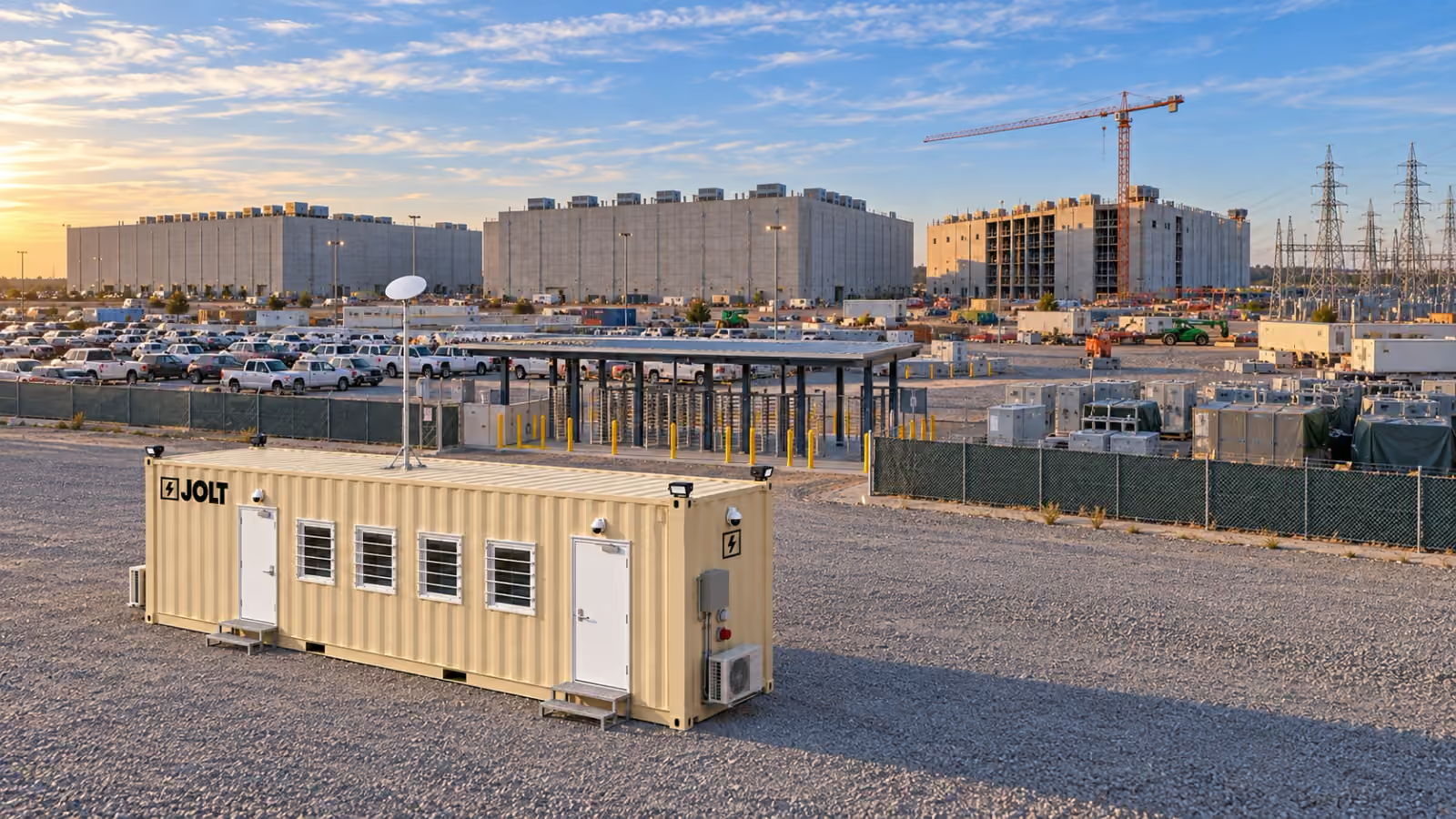
Prepare a Grid site for pad access, a 60 A shore inlet, Command’s 50 A generator inlet, placement, leveling and four-point anchoring.
- Grid Core
- $1,950/mo
- Grid Command
- $2,750/mo
- DC Deploy
- Quoted per campus
- On-site window
- 6–8 weeks
- Legal-width loadNo oversize permits
- On site in6–8 weeks
- One invoiceper unit
- Badge-ready
- Stackabletwo-high
- Moves withyour phases

Key facts
- The Core the Grid — 40 ft data center site office rents for $1,950 per month as of .
- The reservation deposit on the Core the Grid — 40 ft data center site office is $2,500 as of .
- The minimum rental term on the Core the Grid — 40 ft data center site office is 12 months as of .
- Grid delivery window is 6–8 weeks after the reservation as of .
Cite this page: "What your site needs before a Grid arrives." JOLT (Jolt Rents), https://joltrents.com/data-centers/site-requirements/. Last updated September 17, 2026.
A Grid needs a compacted, level bearing surface with room for placement, a 60 A shore-power connection at its twist-lock inlet, and four-point anchoring. Command also carries a 50 A generator inlet with a mechanical interlock for mobilization before temporary power lands. Everything on this page belongs on the delivery-day checklist below.
Most delivery problems on a data center site come from an obstructed approach, a power conflict or a pad that no longer drains after rain. Walk the site before the delivery window opens.
What pad does a Grid need?
The surface is compacted gravel, asphalt or concrete. Prepare it level and draining, with a clear walkway on the door side. The Grid is a 40 ft × 8 ft × 9 ft 6 in high-cube ISO container with 320 sq ft of floor area.
The unit is leveled on cribbing at its four corner castings. For a stacked pair or a row, leave room for the stair tower or walkway and coordinate the arrangement before delivery. A pad that drains is more important than a pad that is perfect.
How much room does the delivery truck need?
The placement method determines the access needed. A tilt-bed needs a straight, firm approach aligned with the pad and clear overhead space; where truck access is tight or a pair will be stacked, plan for a crane set and a stable setup area.
The overhead clearance is the item to walk before delivery day. Temporary power drops, light-tower masts, crane counterweights parked over the approach, and tree limbs at the property line are the four things that stop a tilt-bed.
DC Deploy covers freight, tilt-bed placement or crane set, leveling on cribbing, four-point anchoring, an electrical rough-in walkthrough with your site electrician and end-of-term pickup. See nationwide delivery for the package and on-site window.
What are the exact dimensions?
| Chassis | 40 ft high-cube ISO container, one-trip, 40 ft × 8 ft × 9 ft 6 in |
|---|---|
| Floor area | 320 sq ft |
| Placement | Tilt-bed placement or crane set |
| Bearing | Leveling on cribbing at four corner castings |
| Shore power | 60 A twist-lock shore inlet |
| Generator inlet on Command | 50 A inlet with mechanical interlock |
| Anchoring | Four-point anchoring |
| Workstations | 4 in Core; 6 in Command |
What power connection does a Grid need?
A 60 A circuit at the unit's twist-lock shore inlet. Your site electrician plans the source, conductors, overcurrent protection and temporary distribution, confirms the voltage at the inlet, and keeps the circuit de-energized until the unit is placed.
If temp power will not be live on delivery day, plan the generator now. Command has a 50 A generator inlet with a mechanical interlock; the 25 kW standby generator is available for $1,850/mo plus fuel. Core uses its 60 A shore inlet and the site electrician's temporary distribution.
Your electrician is responsible for selecting the source and conductors and for confirming the voltage at the inlet before the unit is energized.
What does the site electrician do on delivery day?
Before the truck arrives, the site electrician brings the de-energized 60 A circuit to the placement area. After the unit is set, leveled and anchored, the electrician connects the feed while the JOLT technician walks through the exterior disconnect and panel, including Command's generator interlock.
The electrician energizes the connection. If the electrician cannot attend, the inlet remains ready for the site's electrician after placement.
How is the Grid anchored to the site?
Every Grid receives four-point anchoring on delivery day. The appropriate anchoring method depends on the bearing surface and the site's engineered temporary-structure requirements.
Stacked pairs are connected at the corner castings before the lower unit is anchored, and the Stack Kit's stair tower and landing are secured as part of the stacked arrangement. Confirm any project-specific anchoring criteria with the owner's engineer and authority having jurisdiction.
What data connection does the Grid need?
Command arrives with CONNECT built in: Starlink on a roof mast as backup to site fiber, a router and priority data. It also includes WATCH cameras, an NVR and LTE backhaul. When site fiber arrives, the IT contractor lands it in the rack and Starlink becomes failover.
Core is site-fiber ready with Cat6A cabling, a wall rack, patch panel and Wi-Fi 6 access point. Until site fiber is live, the site provides its preferred temporary connection; readers who need cameras or Starlink on the office should choose Grid Command.
Where should the Grid sit on a data center campus?
Put the Grid inside the controlled site, near a firm truck lane, outside crane operations and off the primary haul road. Many general contractors place the project-office group near the gate and badging queue. Trade offices go near the building the trade is working, and move when the trade does.
Keep both doors clear for egress, separate generators from occupied openings under the site's safety plan, and preserve the roof-mast view on Command. For a Grid Campus, lay the row along the gate road with the stair towers on the gate side, so the upper units open onto the walkway and not onto the haul road.
What about slope, mud, frost and heat?
Slope. Prepare a level bearing surface that can be finished with cribbing. If the area cannot be made level, coordinate a different pad before placement.
Mud. A loaded delivery vehicle needs a firm approach. Compacted aggregate or properly designed access mats can protect a route after wet weather; call before delivery if site conditions change.
Frost. In Ohio, Iowa, Illinois, Indiana and other freeze areas, keep the cribbing area drained and inspect the unit after seasonal ground movement. Keep snow clear of both doors.
Heat. In Arizona, Texas and other hot markets, orient the unit where practical to reduce afternoon solar gain and keep Command's roof-mast area clear.
Divide site readiness by responsible party
A useful readiness meeting assigns each open item to the party that can actually close it. The superintendent owns the approved office location, the route through the active site and the date when that route must remain open. The civil team owns the bearing surface, drainage and any restoration needed after underground work crosses the office area.
The site electrician owns the source, conductors, protection and connection to the 60 A shore inlet. The IT lead owns the fiber handoff and the network rules for devices used in the office. The access-control vendor owns the badge platform and reader equipment connected to Command's badge-ready doors.
The safety team should review pedestrian access, both egress paths, nearby vehicle movements and the relationship to crane-controlled areas. Security should decide how the driver and technician enter the project and who escorts them. The project engineer and authority having jurisdiction decide whether the temporary office placement needs project-specific anchoring documents or an approval.
Put one name beside every item. A statement such as “electrical has it” is not enough when the temporary-power contractor, building electrician and utility representative have different scopes. Record the person who can authorize a field decision if the marked pad conflicts with current conditions.
The customer retains responsibility for the site, permits, access, utility marking and a representative at delivery under Rental Agreement section 5. That responsibility map should appear in the delivery plan rather than being left in the purchase file.
Mark underground and overhead utilities before placement
Treat the office pad as a work area, not as unused ground. Ask the civil team for the current utility plan and compare it with field markings. Include temporary feeds, communications routes, storm drainage, water lines and any abandoned service that remains in place.
Marking matters at the pad and along the equipment route. The person directing placement should know where vehicle wheels, cribbing and anchors may bear. If the location changes after the utility walk, repeat the review for the new position rather than carrying over an approval tied to the old pad.
Look above the route as carefully as below it. Temporary conductors, communications lines and lighting may have changed since the logistics drawing was issued. Crane booms, roof masts and the elevated end of a tilt-bed make the full work zone relevant, not only the final outline of the container.
Coordinate any conflict before the delivery window. Do not ask the driver or technician to choose between an unmarked utility and an improvised placement. The site's designated representative should have an approved alternate location or the authority to stop the set.
The agreement makes locating and marking underground and overhead utilities a customer responsibility. It also assigns site damage from placement directed by the customer to the customer. Those two provisions make a documented utility walk a commercial control as well as a safety task.
Give the electrician a written connection brief
Send the electrician the selected build and the planned location before temporary distribution is finalized. Both builds use a 60 A twist-lock shore inlet. Command's separate generator connection is rated at 50 A and includes a mechanical interlock. Neither interface replaces the electrician's load and source review.
Ask the electrician to identify the source, circuit path, disconnect strategy and who has authority to energize. Confirm where the de-energized connection will wait while the Grid is placed and anchored. Keep the path from creating a trip exposure at either personnel door or across the planned pedestrian route.
If a generator is part of mobilization, document who selects its location, supplies fuel and follows the project's generator rules. The optional 25 kW standby generator connects through Command's generator inlet. The site's electrician still determines whether the proposed source and distribution fit the site plan.
Discuss the later transition to shore power before the generator period begins. The plan should identify the party responsible for the electrical work and the time when the office can be taken out of use for that work. Avoid assumptions about changeover behavior that have not been approved by the electrician.
Section 7 of the Rental Agreement requires a licensed electrician to connect utilities through the provided inlets. Use that requirement in subcontractor scope letters so the connection is not left between temporary-power and building-electrical packages.
Inspect drainage and weather exposure throughout the term
Readiness does not end when the unit is level. Add the office pad to the site's routine condition walk, especially after grading changes or heavy weather. Check whether runoff now approaches the doors, whether aggregate has rutted, and whether stored material blocks an egress path.
Watch the entire access route as the project develops. A firm road during civil work may become a staging lane during steel erection. A crane exclusion zone may move over the office approach. Update the pickup or relocation plan when those changes happen, not at the end of the term.
In freezing conditions, inspect the bearing area after visible ground movement and keep snow and ice away from doors, panels and condensers. In hot or dusty conditions, keep debris away from the same equipment and preserve access for inspection. The customer weather duties are stated in Rental Agreement section 7.4.
After a major weather event, compare the unit with the delivery-day condition record. Report damage, malfunction or a leak promptly through the agreement's stated contact path. Do not alter, lift or move a rented Grid to correct a site condition without written consent.
Choose tilt-bed or crane placement from actual constraints
Start with the final position and work backward to the gate. A tilt-bed decision needs a firm, aligned approach and an unobstructed working area. A crane decision needs an approved setup position, a lift plan owned by the responsible site team and separation from other lifting operations.
Do not choose solely by the space visible around the pad. Review gate width, turns, grades, overhead conflicts, parked equipment and the route available on the confirmed day. Include any time-of-day restrictions created by deliveries, worker arrival or controlled access.
For a proposed stacked pair, put the required lifting work in the site's crane plan. A single Grid may use either placement method under DC Deploy. The written plan should state the chosen method, the approved pad and the site contact authorized to direct the final position.
Build a fallback decision before the equipment arrives. If rain softens the route, a temporary line appears overhead or another contractor occupies the setup area, the site contact should know whether an approved alternate exists. Moving the marker a few feet can affect utilities, drainage, door access and the electrical run.
Failed access, unsuitable conditions, weather and an absent representative can create additional charges under Rental Agreement section 5.3. A pre-delivery walk is therefore a scope check, not a ceremonial handoff.
Delivery-day checklist
Confirm the pad
Verify a compacted, level, draining bearing surface that is clear of stored material.Walk the approach
Confirm firm access, turning space and overhead clearance for the agreed tilt-bed or crane placement.Run the power
Bring a de-energized 60 A circuit to the placement area, or coordinate temporary generation.Arrange gate access
Badge or escort the technician and driver, and send vendor orientation requirements in advance.Name the site contact
Assign one person who can confirm the pad location and accept the unit.Check the sky
For Command, preserve a clear view for the Starlink roof mast away from crane operations.Clear the doors
Keep both personnel doors and their egress routes unobstructed.File the paperwork
Confirm the insurance and anchoring information your GC or AHJ requires, and any temporary-structure approval.Receive the unit
The technician coordinates placement, leveling, anchoring and the electrical rough-in walkthrough.Close out delivery day
Walk the unit with your site contact, take condition photos and note the anchor layout.
For availability, choose a build and send the site ZIP, quantity, target date and project details through the data-center reservation path.
Does a Grid need a foundation?
No. It is leveled on cribbing at its four corner castings on a compacted gravel or paved bearing surface.
What power does a Grid draw?
The site provides a 60 A shore-power connection at the unit's twist-lock inlet. The site's electrician confirms the available service and distribution.
Who connects the power?
Your site electrician connects and energizes the feed. The JOLT technician provides the electrical rough-in walkthrough included with DC Deploy.
How much overhead clearance does the tilt-bed need?
Clearance depends on the placement equipment and approach. Confirm the full route with JOLT before delivery and remove temporary lines, equipment and limbs that could obstruct the set.
Can a Grid be placed on a slope?
The placement area must be prepared level and able to drain. If it cannot be made level for cribbing, coordinate another pad or placement plan.
How is it anchored?
DC Deploy includes four-point anchoring. The method is selected for the surface and must also satisfy the project's engineered temporary-structure requirements.
What internet does the Grid need?
Command includes Starlink as backup to site fiber plus LTE backhaul for WATCH. Core is site-fiber ready, so the site supplies fiber or another temporary connection.
How far from the laydown yard should the office sit?
Place it inside the controlled site near suitable truck access, away from crane operations and the primary haul road. Coordinate the exact location with the logistics and safety teams.
Your delivered price
Pick the unit, rent or buy, and the job ZIP. Monthly rent and the route show as you go; we email the full delivered price with a 14-day lock.
Pick a length
Drawn to scale, side view.
Step 1: Unit
The Grid · Command
Which 40 ft?
Step 2: Rent or buy
12-month starting term for project quotes.
Step 3: Job ZIP
Delivery and pickup: quoted for your site.
Step 4: Send it
Request a written delivered quote from the project desk.
Step 5: Your project quote
- JOLTSite offices for data center construction. Nationwide.
- DataCenterProductNationwide Grid Command: badge-ready, connected, and ready the day it lands.
- DataCenterGuideNationwide data center site office pricing. All of it.
- DataCenterGuideDC Deploy for any campus in the lower 48.
- DataCenterMarketData center site offices in Texas: The Grid, nationwide.
- DataCenterMarketData center site offices in Virginia: The Grid, nationwide.
- DataCenterMarketData center site offices in Ohio: The Grid, nationwide.
- DataCenterGuideHyperscale, colocation, edge: what each build needs from a site office.
Talk to a data center specialist.
DC Deploy covers any site in the lower 48.
A deposit holds your delivery window. Cancel free of charge more than 14 days before the first day of the window. Deposits from $85 are applied to your first invoice.